



contact with Vast Edge

SAP HANA Database Backup, Report & Restore

Talk to an Expert

Trusted by Global Brands

HHI
Art
Act
Natura
quorum
ForeScout
Cokeva
BioMarin
christie
Upwork
Mother
Walmart

As per IDC, Forrester and other research groups, continuous full and incremental data backups is a must to attain few seconds of RPO and under 10 minutes RTO. To mitigate risks due to unforeseen circumstances or human/machine errors, the first task across all environments (poc, dev, qa, & prod) must be to back up both code and operational data. With SAP HANA being a cornerstone of many organizations' data infrastructure, reliable backup mechanisms are essential to protect against data loss and ensure business continuity. In addition to backup and restore, data backups are being leveraged by several small and large organizations for reporting and audit trail purposes.
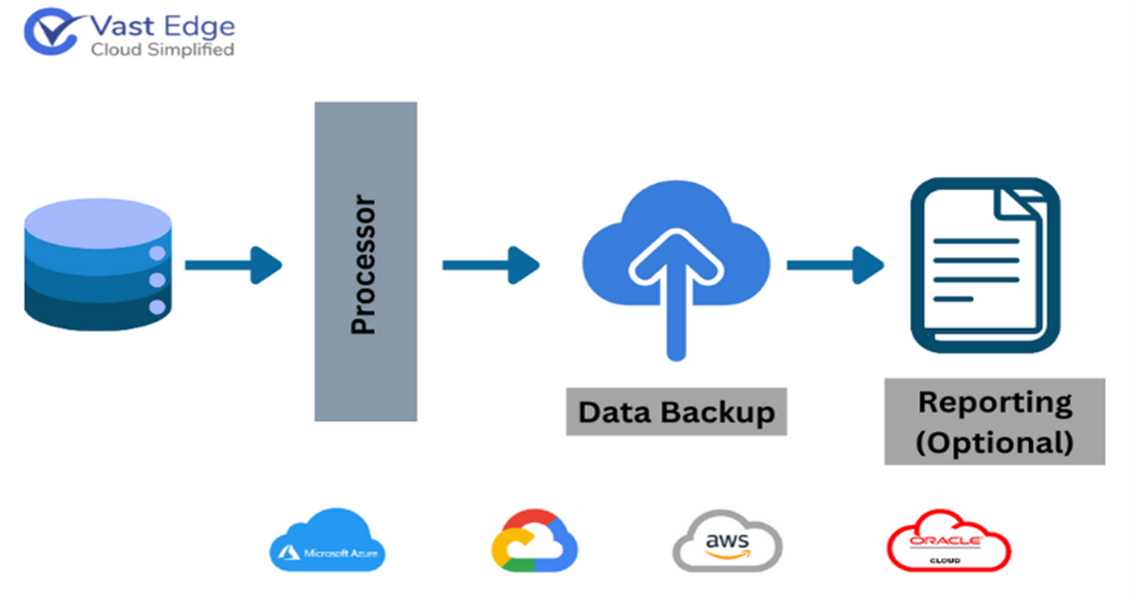
Vast Edge Backup Solution for SAP HANA

Vast Edge offers robust SAP HANA backup solutions to ensure the safety and integrity of customer’s critical data. Vast Edge employs advanced backup strategies tailored to the specific needs of SAP HANA environments, leveraging technologies such as snapshot-based backups, log backups, and automated backup scheduling. Our expert team designs comprehensive backup and recovery plans that consider factors like data volume, retention policies and compliance requirements (encryption in transit and at rest)

The Need for Data Backup

Leading Fortune 500 companies like Microsoft, Home Depot, JPMorgan Chase, Facebook, and Target have also fallen victim to some of the most significant data breaches in history. This highlights a widespread vulnerability across the corporate landscape, where virtually no large entity has remained untouched.
Over the past decade, the repercussions of inadequate cybersecurity measures have reverberated throughout the business world, resulting in staggering financial losses amounting to billions of dollars.
Moreover, these breaches have left consumers exposed to the risk of financial crimes, underscoring the urgent need for enhanced security protocols and proactive measures to safeguard sensitive data.

By partnering with Vast Edge for SAP HANA backup, businesses can mitigate risks, safeguard their data assets, and maintain uninterrupted operations, even in the face of unforeseen challenges or disasters.

SAP HANA ARCHITECTURE


SAP HANA employs an innovative in-memory computing architecture, enabling lightning-fast data processing and real-time analytics.

image
card image

SAP HANA ENCRYPTION

SAP HANA backup encryption is a crucial security measure employed to protect sensitive data stored in the SAP HANA database. By encrypting backups, organizations can ensure that even if the backup files are compromised or stolen, the data remains inaccessible to unauthorized parties.
card image

DATA RESTORATION

SAP HANA facilitates efficient and reliable data restoration by offering comprehensive tools like point-in-time recovery and various backup options such as full, incremental, and differential backups. Its in-memory architecture helps in fast restoration, minimizing data loss and ensuring business continuity.
card image

SAP HANA AUDIT TRAIL

It offers a comprehensive audit trail feature, providing users with the ability to track and view the complete lifecycle of data changes, enhancing transparency, accountability, and compliance efforts.
card image

DATA RETENTION POLICIES

Vast Edge offers up to 7 years of Data Retention, with the option to extend it further through personalized plans
card image

CLOUD BACKUP OF SAP HANA

Cloud providers like Azure, AWS, GCP and OCI offer seamless integration with SAP HANA, allowing organizations to leverage native backup and recovery features within the SAP HANA Cloud platform. This integration streamlines backup processes, enhances data protection, and simplifies management tasks for SAP HANA administrators.
card image

DATA ACCESS POLICIES and SECURITY

Regular reviews of user access rights and permissions are essential to ensure compliance with data access policies. These reviews involve monitoring user access levels, identifying any unauthorized access or excessive permissions, and taking corrective actions as needed. Implementing tools and systems to monitor data access activities in real-time and log access events for auditing purposes helps detect unauthorized access attempts or suspicious activities, providing a record of who accessed the data and when.
card image

MONITORING

Monitoring involves constant surveillance and verification of backup systems and processes to confirm that backups are up-to-date, complete, and functioning correctly. It encompasses various measures, including automated checks, regular audits, and real-time notifications (alerts), to promptly identify any issues or discrepancies in the backup infrastructure. By continuously monitoring data backups, organizations can mitigate the risk of data loss and ensure that critical information remains safeguarded against potential disruptions or disasters.
card image

AI FOR DATA BACKUPS

AI algorithms can detect anomalies in backup processes, such as failed backups, corrupt data, or unusual access patterns. By identifying and addressing these anomalies in real-time, organizations can mitigate potential data loss risks and ensure the reliability of backup operations.
AI algorithms can intelligently identify and eliminate duplicate data across backups, reducing storage requirements and optimizing backup performance. AI-powered backup solutions can perform intelligent verification checks to ensure the integrity and recoverability of backup data.

Vast Edge offers a complimentary demo environment to test our solution. If you're interested in experiencing our demo, please schedule a meeting with one of our Vast Edge experts by clicking on this Microsoft Booking link. This 20-minute session will feature a live demonstration of our Vast Edge SAP HANA backup solution. Upon request, our personnel will provide personalized login credentials for accessing the demo environment.

Loading...

FAQs

Frequently asked questions

Q1. How to backup SAP HANA?

SAP HANA backups can be taken using SAP HANA Studio, Cockpit, or SQL commands. You can perform full data backups, log backups, and configuration backups. These can be scheduled or triggered manually and stored on disk or external storage.

Q2. What are the types of backup in SAP HANA?

The main types are Data Backup, Log Backup, and Configuration Backup. Data backups capture the full database, log backups record changes for recovery, and configuration backups store system settings.

Q3. What are the 4 types of data backup?

The four common types are Full Backup, Incremental Backup, Differential Backup, and Transaction Log Backup. Each varies based on how much data is copied and how recovery is performed.

Q4. What is the backup strategy of SAP HANA?

An SAP HANA backup strategy typically includes regular full data backups combined with frequent log backups. It ensures point-in-time recovery, minimal data loss, and compliance with retention policies.

Q5. How to take SAP HANA backup?

You can take a backup via SAP HANA Studio/Cockpit by selecting the system and choosing “Backup Now,” or by running SQL commands like BACKUP DATA. Ensure proper storage location and monitoring for successful completion.

Q6. Can I run an SAP HANA backup while the database is online?

Yes. SAP HANA supports online backups, meaning you can perform a full, incremental, or differential backup without interrupting business operations or disconnecting users. The database remains fully functional during the process.

Q7. How do I limit the size of SAP HANA backup files?

You can use the parallel_data_backup_backint_channels parameter to split backups into smaller parts. For file-based backups, the max_file_size parameter in the global.ini file allows you to define a threshold (in GB) to prevent single files from becoming too large for the file system.

Q8. What happens if a scheduled SAP HANA backup starts before the previous one finishes?

SAP HANA does not allow two data backups to run simultaneously on the same service. If a second backup is triggered, it will fail with an error message, while the first backup continues to completion.